Transactional outbox in Dataverse
Table of Contents
What is transactional outbox pattern? #
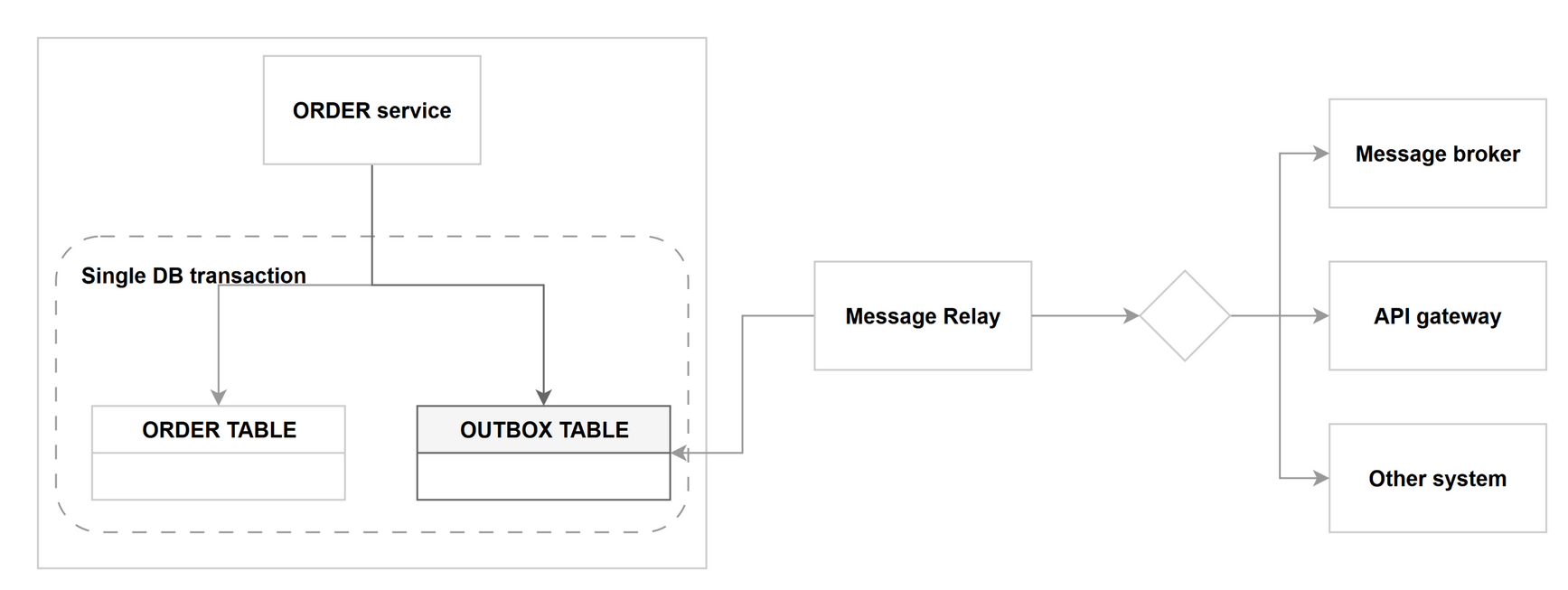
Let’s start with the simplest example, which we all use, and that is an e-mail client. When you write an e-mail message and hit “send”, the message is first saved in your outbox folder, from which your client (or server-side logic, but let’s not get into any details here) pushes the message to a server that handles the rest. If there were no outbox, or other caching mechanism, then in case of some network issues or other kinds of problems, your message could be lost.
We can apply the same principle in case of information systems when we want to notify someone about some important event that happened in our system. If we add the atomicity principle (all operations go through successfully or not at all), we get the transaction outbox pattern.
This pattern solves a problem that we call in the industry, the dual-write problem - the lack of transaction coordination when pushing data to multiple systems.
Transactions in Dataverse #
To successfully build a reliable transaction outbox based on Dataverse, we really have to understand some basics about transactions of our lovely back-end. The essentials of transactions in Dataverse are provided by the Event framework. In a nutshell:
- Every request we make against Dataverse is represented by an event / message.
- Each event can have its own logic executed during different stages of what we call execution pipeline. The database transaction starts at PreOperation and ends after the last synchronous PostOperation (if we consider the scenario, where the only target service is the Dataverse instance where the Event was triggered without any immediate external calls). PreValidation runs before that, outside the transaction, which is why it is the right stage to cancel an operation.
- This can get a bit more complex (and it often does) when in the synchronous stages, we trigger other event which has its execution pipeline logic and the cascading continues (the metric we measure this is called Plugin Depth). One thing to keep in mind here: PreValidation never opens a transaction, but at a higher depth it joins the one that is already running. Check
IExecutionContext.IsInTransactionif you need to know.
Do we really need a custom solution? #
Ask this question (in general when building anything on Power Platform, as you should imo utilize as much what the managed platform offers). Dataverse has a built-in Change Data Capture (CDC) that we call change tracking. In my opinion, it is a very underutilized feature. It basically allows a consuming client/service to retrieve the changes for a selected time-span on the entity level. Both Microsoft’s Azure Synapse Link for Dataverse and Link to Microsoft Fabric utilize change tracking to get the latest data.
So is Dataverse change tracking a better option to use instead of custom-built transactional outbox? It depends as both have their use cases and both can co-exist in your systems. My mental model about this usually goes like this.
Use change tracking if
- Your main use case is to replicate data 1:1
- Consuming raw data changes based on your Dataverse DB / Entity schema is not an issue
- Your priority is to maintain as little custom code as possible
Use transaction outbox if
- Your main use case is to share meaningful business / domain events that are hard to interpret from raw data changes
- Your Dataverse DB / Entity schema changes often
- Your responsibility is to push these events to the outside of the boundaries of your system
Building the solution #
During the research I noticed that Chris Piasecki submitted his Transactional Outbox reference architecture to be part of the architecture center (gh issue). I am glad to see that this topic is getting more traction and more best practices are being shared in the community. Hopefully Chris’ design will be published soon so definitely check it out.
So if you decided you still want to go with a transactional outbox and you understand the Dataverse Event framework mentioned earlier, then building the solution is quite simple.
-
Write a plug-in and register a
SdkMessageProcessingStepso you “hook” into the synchronous PostOperation execution pipeline of the main DB event (in most cases aCreateorUpdateof a record). -
In your code, identify if the DB event characterizes the business event you care about.
-
If it does, create a corresponding row in your outbox table.
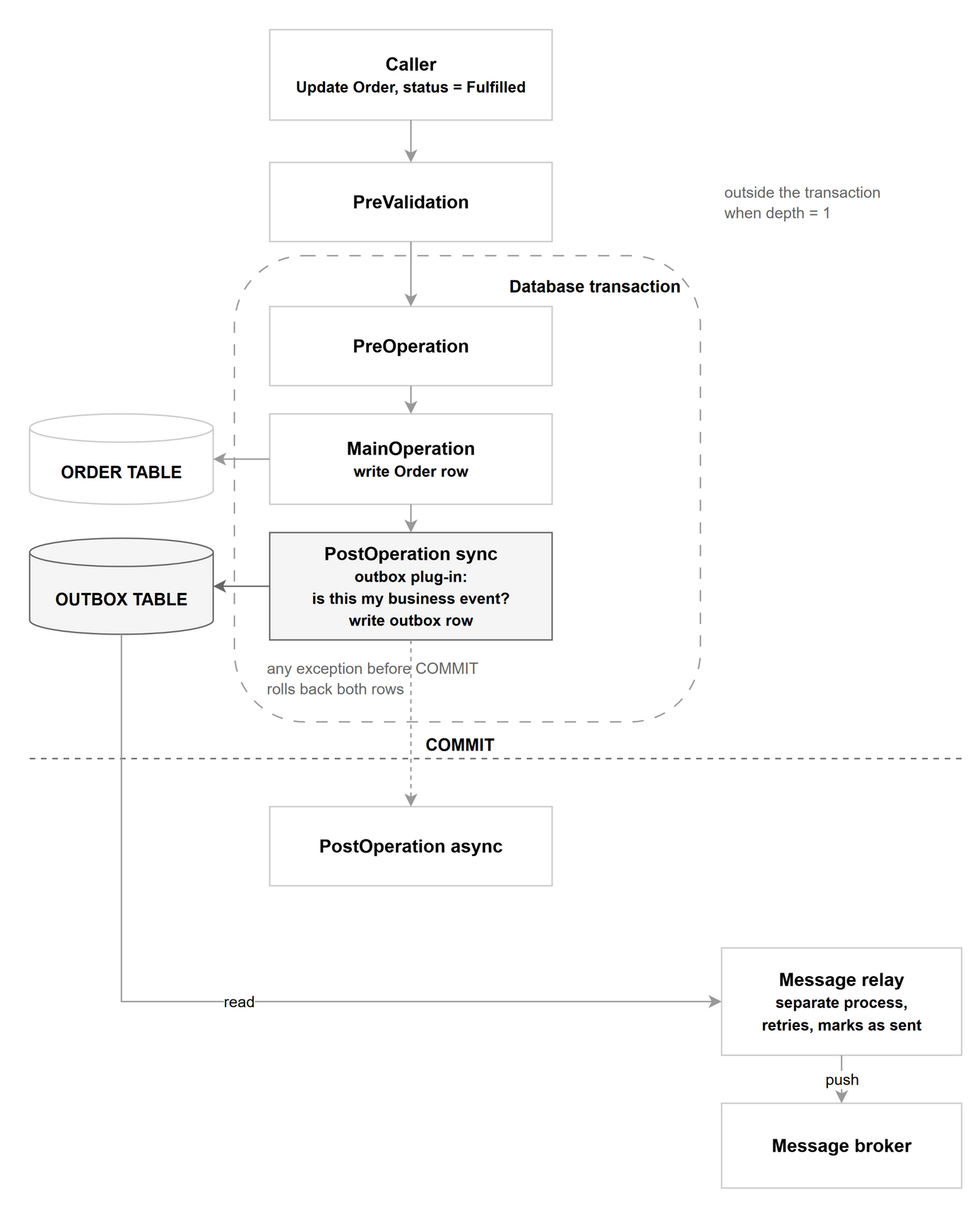
To get to your end goal, you will need some kind of component that pushes the event, represented by the new outbox record, to either your central message broker or whatever the intended destination is. Usually we call this component a Message relay. Won’t get into more details here, as this part would be very specific based on what the edge destination of your message is. Regardless, ensure you follow the best practices like idempotency, respecting the order of the events etc.
Optional but useful #
A few things I want to mention that you could consider.
Express the business events as components #
The first is to have a layer that represents the actual business events. I have touched this topic in my earlier articles about Business Events Catalogs. Basically, every event, you want to push outside of your system, should be described in the form of a custom message, where its name starts with the On* prefix and has no main operation registered.
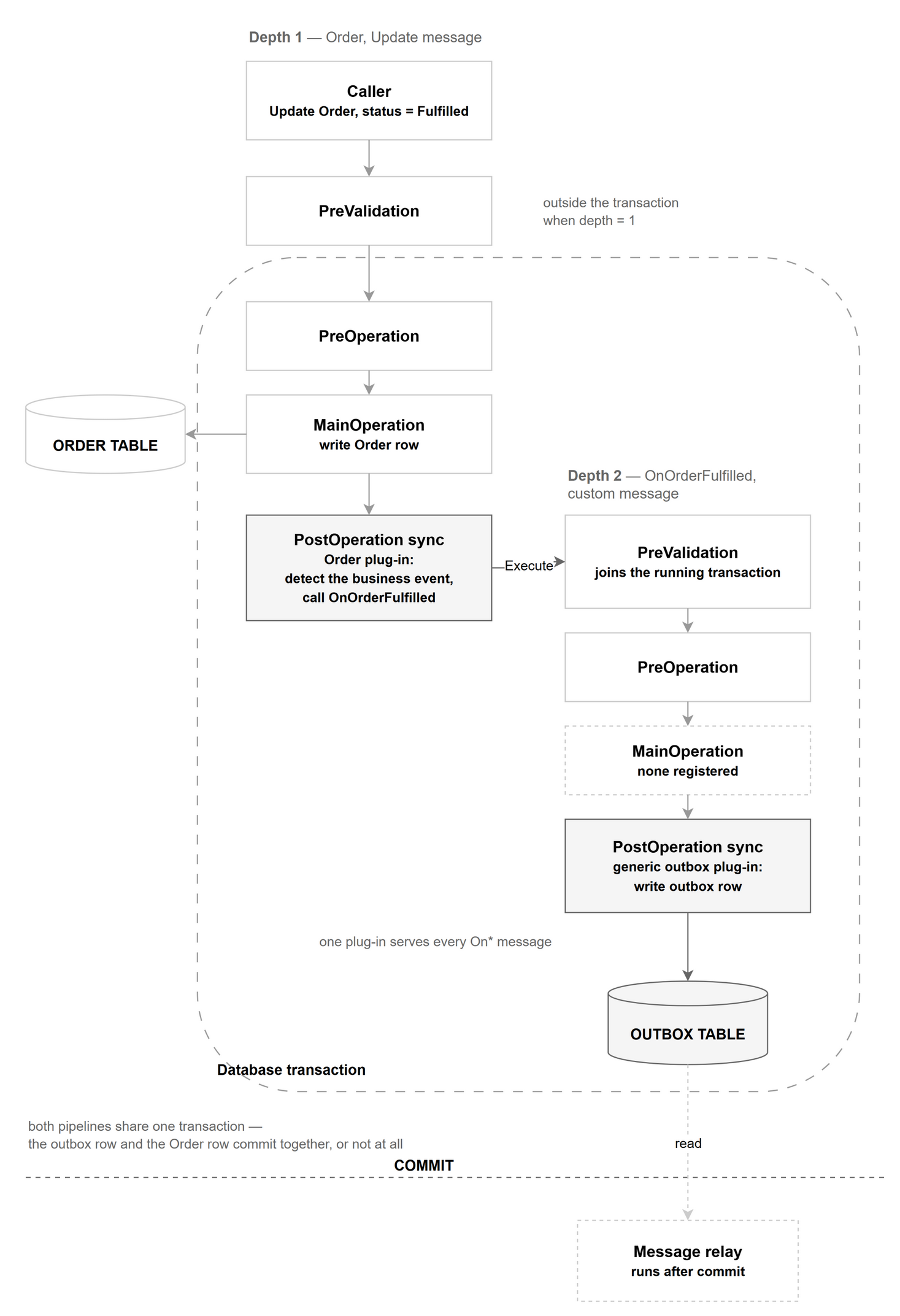
This doesn’t add much to the functionality of the solution. The main thing is to force yourself or your colleagues to think about these events more in the business layer, and how the domain, that your system is responsible for, plays a role in your organization. As a side effect, this kind of abstraction makes the codebase more maintainable as it follows the separation of concerns principle.
Elastic table as the outbox #
I think the elastic tables are great for this use case with a small caveat.
First, the contextual data you will pass along the event will probably be in a semi-structured format and elastic tables offer the JSON column with some special server-side query abilities.
Second is the automatic retention. Every elastic table has a TTL column, where you can specify the number of seconds after which a given row should be deleted.
The caveat of elastic tables is how they behave differently in transactions. Most importantly, in a given synchronous execution pipeline, where you attempt to create a record in an elastic table, any further error thrown after the create was called won’t roll back the whole transaction, as it does for standard tables. Therefore you should really include the operation against the elastic table as the last one in the whole pipeline.
Maintain a map of subscribers + events #
In an ideal world, your organization’s centralized message broker distributes the events across the whole org and often maintains the list of subscribers per event / topic. In practice, besides the main broker, you will have to deal with some async direct point-to-point integrations or even multiple brokers. In such scenarios, I recommend maintaining a list of unique combinations of subscribers + business events. A simple standard Dataverse table is more than fine (you can relate the outbox table rows to these records). You can leverage it if you need to build specific event payloads based on the subscriber needs.