Microsoft has just released a new preview feature called Filtered record ownership. This post gives a short overview of it, based on my first tests in a non-production environment.
What’s new?
If this is the first time you hear about it, I recommend reading the MS Learn article first and ideally playing around with the feature a bit in your own environment. I won’t go into much detail on things that are already covered in the official docs.
Entity record filters
TL;DR: it is a new, declarative way to manage row-level security (RLS) in Dataverse, next to the existing concepts built around record ownership, business units, hierarchies, etc. Instead of ownership, you configure record filters as FetchXML expressions. Their conditions are evaluated for a combination of table and operation (the usual Create, Write, Append, etc.). You assign the record filters in security roles the same way you set the privilege depth (User, Business Unit, Organization, etc.) in the classic model.
Record ownership type
When you create a new table, there is a new option Filtered in Record ownership type. Unfortunately, so far it is only available for Standard tables, not for other table types. As expected, such a table has no ownerid or owningbusinessunitid column, so the only way to do RLS on it is with the new filters.
Tables for the new filters
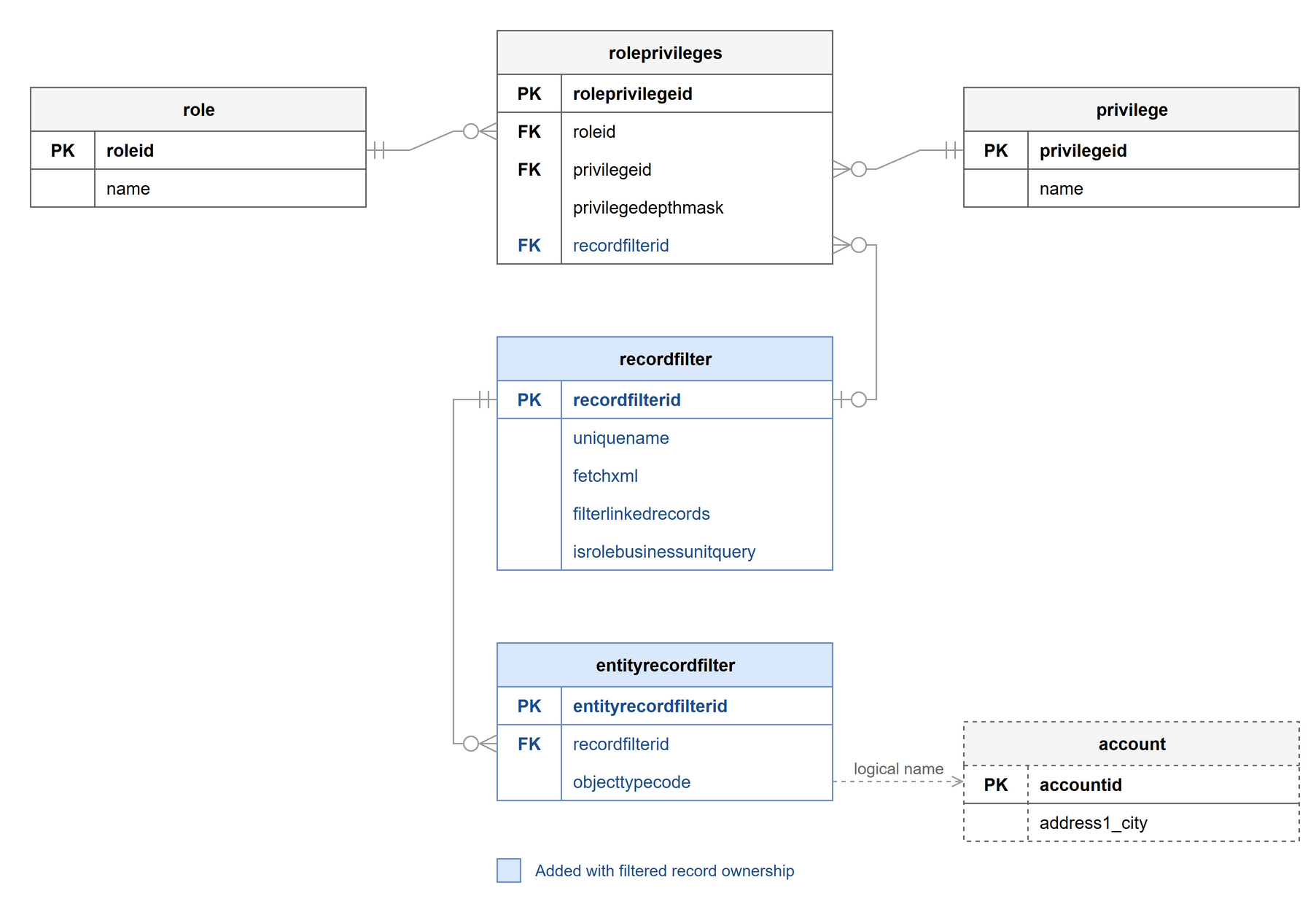
New tables, plus a new lookup on roleprivileges, were added to store the configuration.
Applying filters to existing tables
You can also apply filtered record security to any existing (or new) standard table owned by user/team or organization. I believe this will be the most common use case for most of us, as our solutions are usually built around existing system or custom tables.
Filtering based on link-entities
As you can imagine, you will often need filter conditions on linked records. For example, you want users to see only contacts whose parent account is a supplier (customertypecode eq 11). You can create such a filter, add it to a security role and assign the role to a user or team.
<fetch>
  <entity name="contact">
    <link-entity name="account" from="accountid" to="parentcustomerid" alias="O">
      <filter>
        <condition attribute="customertypecode" operator="eq" value="11" /> <!--supplier-->
      </filter>
    </link-entity>
  </entity>
</fetch>
This brings us to an important question. Does the user need read permission on the link-entity (the account records in the example) for the condition to be evaluated correctly?
By default, yes. You can change this, but it is not very obvious how. The recordfilter table has a boolean column filterlinkedrecords. It is not on the default main form of recordfilter, so you have to set it through the API or some other tool.
With the default value true, every link-entity condition is evaluated with the user’s permissions. If you switch it to false, the link-entity conditions are evaluated regardless of the user’s read permissions on the linked records. In a way, it escalates the privileges. I guess it is similar to using the SYSTEM org service in the Dataverse .NET SDK, but only to read and evaluate the expression. I can imagine it also performs better with false, as the back-end doesn’t have to check the user’s permissions on the linked records. Pretty neat.
User-context operators
FetchXML has a few operators that use the current user’s context, such as eq-userid, eq-useroruserteams and eq-businessid. They work in record filters too.
This lets you control access through lookups to users or teams on the record itself, outside of record ownership. From a schema evolution point of view, I’m not a big fan of arbitrary lookups that assign a person to a role in some context. But at least record filters now give those lookups a real meaning in authorization.
For example, you want users to access only contacts whose parent account has them set as the Preferred User.
<fetch>
  <entity name="contact">
    <link-entity name="account" from="accountid" to="parentcustomerid" alias="O">
      <filter>
        <condition attribute="preferredsystemuserid" operator="eq-userid" />
      </filter>
    </link-entity>
  </entity>
</fetch>
The great thing, in my opinion, is that these operators still use the actual user, even inside a link-entity with filterlinkedrecords set to false. So the user doesn’t need read permission on the linked record that the condition is evaluated against. In the example, the user doesn’t have to be able to read the account.
Additive, not restrictive
There are two more scenarios that I think need a bit of explanation. A user or team can have multiple security roles, and these roles can give privileges that seem to contradict each other.
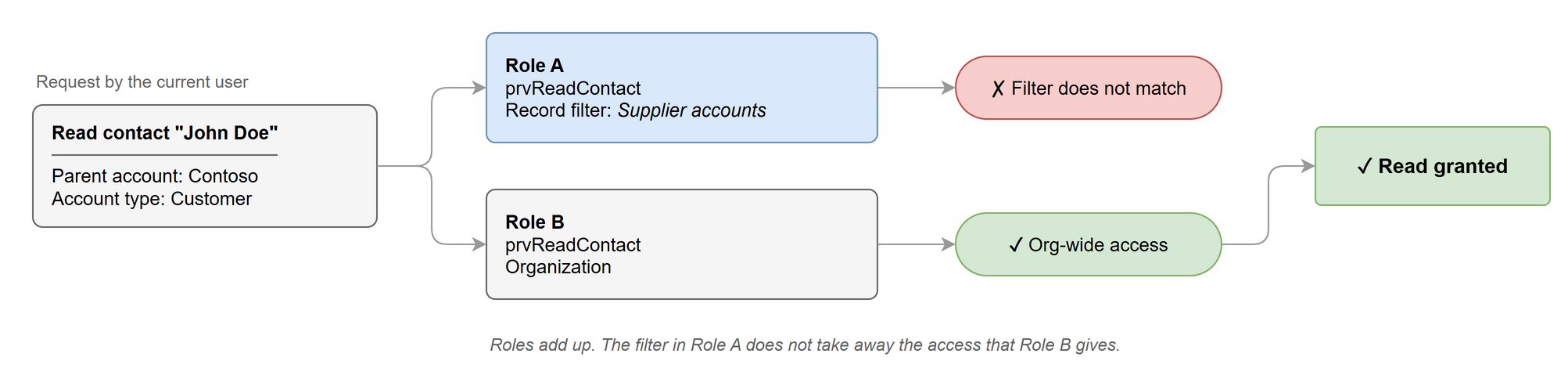
First, take a table with user or team ownership. One security role gives a privilege with a record filter, and another role gives the same privilege with a classic scope (for example, Organization). In this case, the permission is always granted.
Second, the same user or team gets two different record filters for the same table and operation through their security roles. One filter rules out the record, the other one doesn’t. Again, the permission is granted.
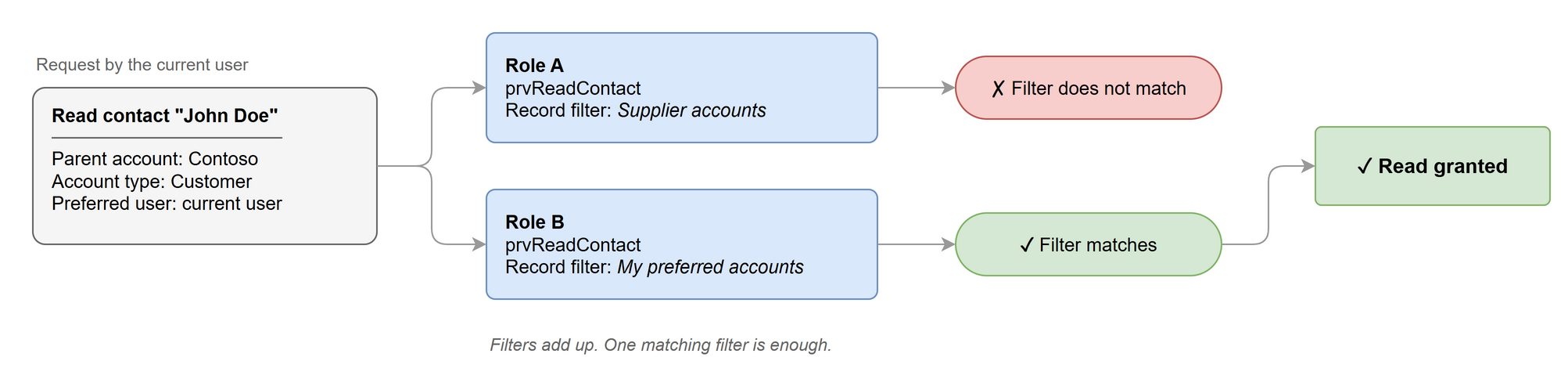
I guess this pretty much follows how the classic permission scopes work. Roles add up, they never take access away.
So if you want a record filter to actually limit access, make sure that no other role of the user gives broader access to the same table and operation. This includes roles the user gets through teams.
ALM
The new tables recordfilter and entityrecordfilter are solution-aware, so their records work like other Solution Component Framework (SCF) components. You can add them to a solution, and when you unpack it, each record is a separate XML file.
<recordfilter uniquename="my_contact_record_filter">
<displayname default="Contact Record Filter">
<label description="Contact Record Filter" languagecode="1033" />
</displayname>
<fetchxml><fetch>
<entity name="contact">
<link-entity name="account" from="accountid" to="parentcustomerid" alias="O">
<filter>
<condition attribute="preferredsystemuserid" operator="eq-userid" />
</filter>
</link-entity>
</entity>
</fetch></fetchxml>
<filterlinkedrecords>0</filterlinkedrecords>
<iscustomizable>1</iscustomizable>
<isrolebusinessunitquery>0</isrolebusinessunitquery>
<statecode>0</statecode>
<statuscode>1</statuscode>
</recordfilter>
<entityrecordfilter objecttypecode="contact" recordfilterid.uniquename="my_contact_record_filter">
  <iscustomizable>1</iscustomizable>
  <name>Contact Entity Record Filter</name>
  <statecode>0</statecode>
  <statuscode>1</statuscode>
</entityrecordfilter>
In the security role XML, each role privilege points to its recordfilter by unique name.
<Role id="{8a5f3a57-b624-430c-8b4e-9a28bd65046b}" name="Record Filter role">
  <IsCustomizable>1</IsCustomizable>
  <IsAutoAssigned>0</IsAutoAssigned>
  <RolePrivileges>
    <RolePrivilege name="prvReadContact" level="RecordFilter" recordfilter="my_contact_record_filter" />
  </RolePrivileges>
</Role>
First impressions
Overall, I think this is a huge addition to authorization in Dataverse.
Sometimes the classic ownership model feels too rigid. Organizational changes, or even small changes in context, are expensive to reflect in the model, for example when you keep creating business units and moving them around in the hierarchy. Filtered record security could help in those cases, when the org hierarchy changes all the time or when you need more granular permissions.
One thing to keep in mind is performance. The filter queries are most likely evaluated on every request where a filter affects the user’s privilege. I haven’t done much testing of this so far.
There is still a lot to test in different scenarios. For example, the recordfilter table has a read-only boolean column isrolebusinessunitquery. I tested it briefly, but I wasn’t able to figure out what switches it to true. Based on its name, my guess is that it marks whether the filter is evaluated in the context of the security role’s business unit instead of the user’s. That would matter with Modernized business units, where a user can get roles from other business units. This could open up some very interesting scenarios.
So let’s get more familiar with the feature before it goes GA and give Microsoft some constructive feedback.
Anyway, happy filtering!