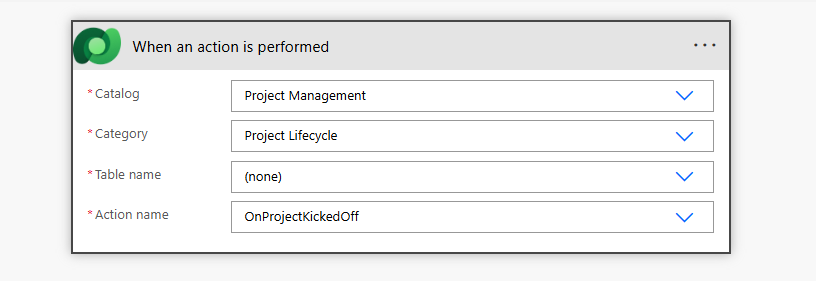
When you are creating a Power Automate flow with the Dataverse trigger “When an action is performed”, you are being asked to select a Catalog and a Category. Personally, I had no idea what they meant, so I just selected “ALL” which then allowed me to select my Custom API message. Finally I decided to dig deeper to find out more about what those Catalogs and Categories actually are.
Microsoft covers this topic to a solid degree in these two KB articles so I recommend going through them before continuing:
- Microsoft Dataverse business events - Power Apps | Microsoft Learn
- Catalog and Catalog Assignment tables (Microsoft Dataverse) - Power Apps | Microsoft Learn
Don’t get confused by this article - Catalog in Power Platform. That is a different kind of Catalog, which relates to distribution of packages in your organization directly from Power Platform.
What are the Catalogs?
So what are the Business Events Catalogs actually?
First, they don’t bring any new functionality to the Dataverse event-based framework. Their sole purpose is to use a hierarchical structure to organize, name, and describe important business events in the form of custom messages (custom APIs), tables, custom actions and improve their visibility for external consumers or internal implementation team.
Second, even though this doesn’t bring any direct technical innovation, in my opinion, this area is very important and should not be underestimated in any mid-to-large scale implementation. Having documented sets of important business events directly inside the system has multiple benefits, for example:
- Single place of truth for business-oriented events documentation
- Promotes discoverability and knowledge-sharing
- Events are abstracted from actual database transactions if utilizing custom messages
I am not saying that the Dataverse catalogs should be the only place to document important business events, but it is a good starting point if you don’t have anything.
Catalog hierarchy
How to create catalog components is well described in the official docs so I won’t go into much detail here.
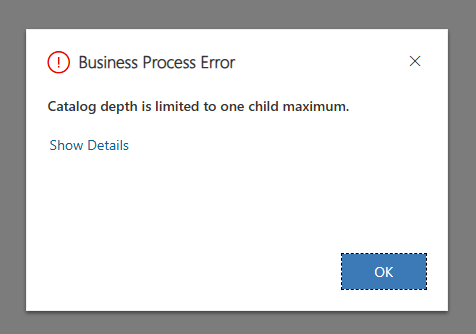
The important thing to note is that the catalog hierarchy is enforced to be two-levels. First, you need a root-level Catalog. You can have multiple root-level Catalogs in your environment. Then you need a second-level Catalog (category) where you specify the root-level Catalog as parent. This is the maximum depth you can go with catalogs, as we are unable to go deeper in the hierarchy.
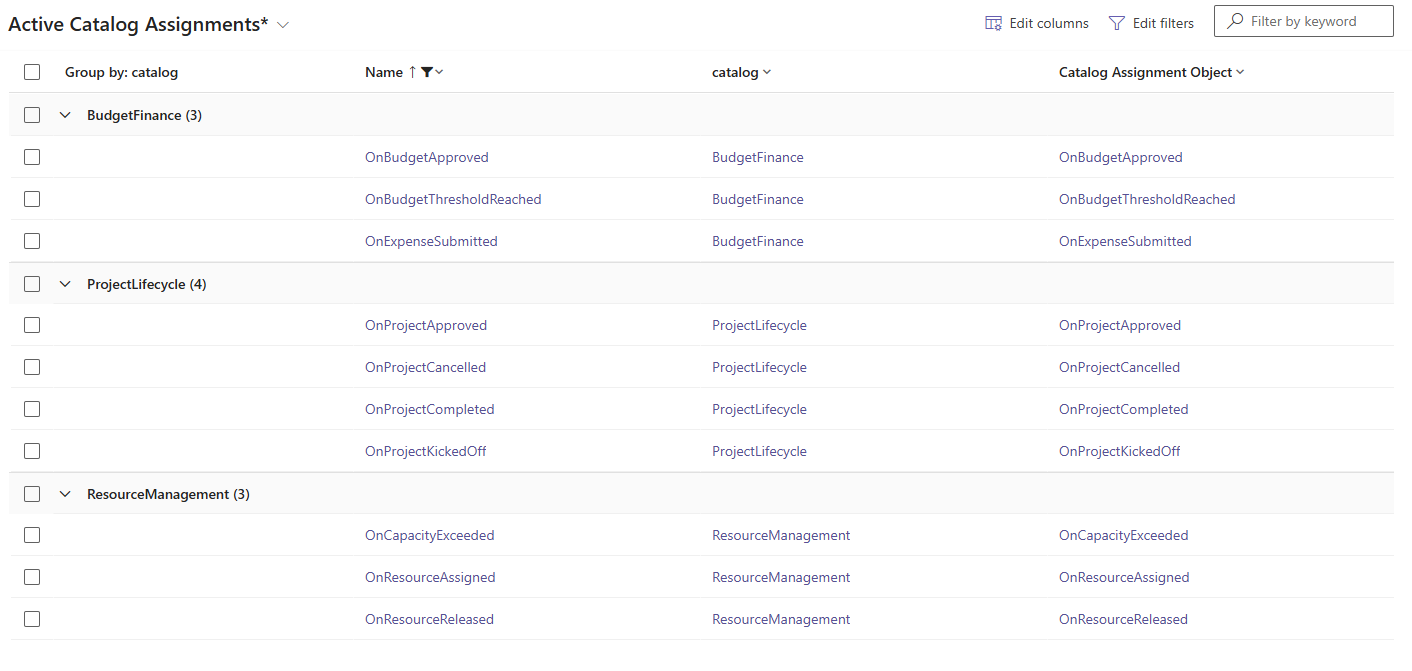
When you have a root + second-level catalogs ready, you can create catalog assignments. Each catalog assignment points to one of three object types: a table (entity), a custom API, or a custom process action.
You assign it to a second-level catalog (category), and from that point it becomes visible and selectable in the “When an action is performed” trigger in Power Automate under your custom categorization.
Naming the events
Based on the docs, Microsoft’s own recommendation is to utilize the On prefix for custom business events.
If your custom action is intended only for subscribers to respond to, we recommend that the name of your custom action begin with
On
This is very important to distinguish pure business event messages vs custom messages tied to a specific operation, usually synchronous, with logic (it does something directly when called).
Organizing the events
Microsoft gives some great tips in their docs for designing events. In general, it is recommended to drive the categorization as business-oriented and avoid technical-oriented categorization if possible. The main point of catalogs is about discoverability for subscribers, and consumers usually (should) think in terms of business processes, not concrete database tables.
Here are some of my thoughts on how the events could be organized based on your circumstances:
1. Group by business domain
Categories map to how the business thinks about the solution, not to the underlying data model. This would be my recommended default approach as it forces the developers/makers to think more in the business context.
 Project Management
 ├── Project Lifecycle
 │     OnProjectApproved, OnProjectKickedOff, OnProjectCompleted, OnProjectCancelled
 ├── Resource Management
 │     OnResourceAssigned, OnResourceReleased, OnCapacityExceeded
 └── Budget & Finance
       OnBudgetApproved, OnExpenseSubmitted, OnBudgetThresholdReached
2. Group by audience
When you have distinct consumer groups you can organize categories around who is expected to subscribe.
 Project Management
 ├── External Integration Events
 │     OnTimesheetApproved, OnInvoiceGenerated, OnMilestoneCompleted
 └── Internal Automation
       OnTaskOverdue, OnApprovalPending, OnRiskEscalated
3. Group by event origin
When your solution handles events from both internal Dataverse processes and external systems, you can organize categories around where the events originate. This aligns with Microsoft’s external events pattern where custom APIs for external events have specific settings (no main operation plugin, async-only processing steps, no response properties).
 Project Management
 ├── Internal Events
 │     OnProjectApproved, OnBudgetThresholdReached, OnTaskOverdue
 └── External Events
       OnTimesheetSyncCompleted, OnVendorPaymentPosted, OnInvoiceGenerated
Tables and bound custom messages
Including tables in your catalog is entirely optional in my opinion. Your main goal when cataloging should be identifying important business events, not just data stores.
It is also worth noting that custom APIs that are bound to a specific table can be added as catalog assignments directly — not through the default maker portal forms, but via the Web API, if that is something you wish to do.
That said, my preference is to keep business events decoupled from database transactions entirely. I would always make custom API messages intended as business events global (not bound to any entity). A global event like OnBudgetThresholdReached clearly communicates that something meaningful happened in the business process. It does not tie the subscriber to a specific table’s lifecycle and gives you the freedom to change the underlying data model without breaking the event contract. The event becomes a stable integration point regardless of how the data is stored or structured behind it.
The missing pieces
I already mentioned that the catalogs themselves don’t bring any new functionality (besides exposing the events in a categorical hierarchy for Power Automate). However, the custom business events, represented by custom API messages, are the most important building blocks of the catalogs and there are a couple of things that I would like Microsoft to add and improve in this area.
First, securing the custom message/event can be done by specifying a Dataverse privilege required to call the message. This is fine but Microsoft to this day still doesn’t allow generating custom privileges besides creating custom tables. I wish I didn’t have to create a dummy table every time I want to control authorization for my custom message.
Second, I would like to have some first-party “lightweight” component that allows me to declaratively trigger these events. Yes we have Power Automate flows and plugins that handle this, but I would like to have something much simpler (there is never enough abstraction :) ) while keeping separation of concerns (by not putting the action to call the message in multiple flows, or having to write a dedicated .NET plugin or flow for each database transaction + message call). A simple declarative component where you would specify trigger (with filter expression), message to call and some sort of expression to map data into input parameters
Third, there is no first-party visibility into who publishes and who subscribes to a given business event. Once you have a catalog with dozens of events, the natural questions become: “Who is calling this event?” and “What automations are listening to it?” For internally managed automations, this can and should be tracked at the code repository level — your solution source should make it clear which plugins or flows react to which events. But for external parties that either emit events into your environment or subscribe to your events, there is currently no way to document or discover these relationships directly within the platform. A simple overview showing publishers and subscribers per cataloged event would go a long way toward making business event catalogs a complete governance tool, not just an organizational one.
A note on enterprise messaging
As a side note, relying purely on Dataverse custom messages for integration purposes might not be sufficient in more complex scenarios. Depending on the context, enterprise-grade distributed messaging systems such as Azure Service Bus or Apache Kafka should be considered to handle event routing, delivery guarantees, and scalability requirements. Both approaches can co-exist and benefit from each other — Dataverse business events can serve as the source of truth for what events exist and what they mean, while the actual event delivery to external subscribers is handled by a dedicated messaging infrastructure. This might be a topic for another post.