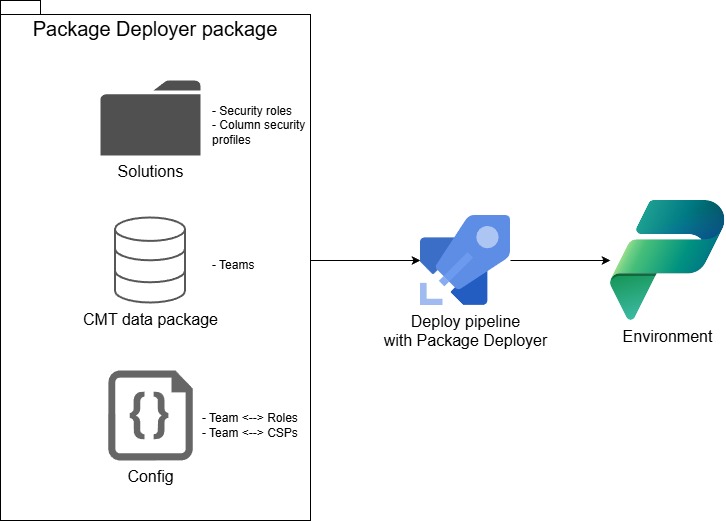
In the world of Power Platform ALM, we have largely solved the problem of moving logic and structure. We pack tables, flows, and other components into Solutions, commit them to git, and deploy them via pipelines (at least in my scenario). But there is a glaring gap in this automated chain: Security Assignments.
While the Security Roles themselves travel inside Solutions as root components, the assignments of those roles to Dataverse Teams do not, as they are just data. The same applies to Column Security Profiles.
For many, this results in a fragile “Source of Truth.” Assignments are often managed manually in each environment or are handled via one-off scripts. As the complexity of a project grows—especially in enterprise environments with strict governance—relying on manual intervention or unmanaged data loads becomes a significant risk.
In this article, I’m going to tackle the problem of establishing a configuration-driven source of truth for Dataverse security assignments. We will look at why standard tools like the Configuration Migration Tool (CMT) fall short for this specific use case, and I will walk you through a custom solution that solves the problem.
Where CMT data packages fall short
The CMT is the de facto standard for importing data into Dataverse as it “Upserts” data into a target environment. It can also handle creation of many-to-many associations between entities. This sounds like a perfect fit for our scenario as the two assignments (teamroles - security roles to teams and teamprofiles - column security profiles to teams) that I am going to tackle are basically both many-to-many relationships in Dataverse.
<!-- data.xml generated by CMT-->
<entities xmlns:xsd="http://www.w3.org/2001/XMLSchema" xmlns:xsi="http://www.w3.org/2001/XMLSchema-instance" timestamp="2025-12-07T15:24:44.9797180Z">
  <entity name="team" displayname="Team">
    <records>
      <record id="cf42b04e-80d3-f011-8543-7c1e527829f3">
        <field name="name" value="Course Managers" />
        <field name="teamtype" value="0" />
        <field name="teamid" value="cf42b04e-80d3-f011-8543-7c1e527829f3" />
        <field name="membershiptype" value="0" />
      </record>
    </records>
    <m2mrelationships>
      <!-- teamroles -->
      <m2mrelationship sourceid="cf42b04e-80d3-f011-8543-7c1e527829f3" targetentityname="role" targetentitynameidfield="roleid" m2mrelationshipname="teamroles">
        <targetids>
          <targetid>17f74987-c8e1-473f-8369-eb77976502dd</targetid>
        </targetids>
      </m2mrelationship>
      <!-- teamprofiles -->
      <m2mrelationship sourceid="cf42b04e-80d3-f011-8543-7c1e527829f3" targetentityname="fieldsecurityprofile" targetentitynameidfield="fieldsecurityprofileid" m2mrelationshipname="teamprofiles">
        <targetids>
          <targetid>fe46bc91-81d3-f011-8543-7c1e527829f3</targetid>
        </targetids>
      </m2mrelationship>
    </m2mrelationships>
  </entity>
</entities>
However, if we try to import the data package, we get the following message from CMT during the import:
Processing Entity M2M Relations team (threaded), Imported 0 of 1
Failed to Link N:N relationship associate between team (ID:cf42b04e-80d3-f011-8543-7c1e527829f3) and role (ID:00000000-0000-0000-0000-000000000000), Target Record missing.
The security role I am trying to associate with the team exists in the target environment, but the CMT import refuses to create the association.
When looking closer at the SOAP messages exchanged between CMT and Dataverse (via Fiddler), I did not find any attempt to resolve the target record as it does for other associations; therefore, it just uses the empty guid when creating the association.
While the Team Column Security Profiles associations are imported fine, the Team Roles are not. Also, even if it worked, the CMT cannot be used to disassociate many-to-many relationships, which in my case is kind of important as I want to have a declarative approach to the security assignments.
Package Deployer to the rescue
As I am deploying solutions and data packages via the Package Deployer, I decided to utilize its ability to implement custom logic during the deployment process. At the same time, I wanted to have this logic reusable across different projects and to be as easy to use as possible. Therefore, I decided to develop a small .NET library published as a NuGet package.
The main class in the library is PackageExtension, which implements the ImportExtension class (the default base class for all Package Deployer extensions) and adds custom logic/tasks to handle the security assignments.
In a Package Deployer project, you would simply inherit the PackageExtension class from the custom library and invoke the custom methods in the PostImport stage of the deployment process.
using BeerLike.PackageDeployer;

namespace YourPackageNamespace;
public class PackageExtension : PackageExtension // inherit from the BeerLike.PackageDeployer library
{
    public override bool AfterPrimaryImport()
    {
        SyncTeamRoles(GetImportPackageDataFolderName + "/TeamRoles.json");
        SyncTeamCsps(GetImportPackageDataFolderName + "/TeamCsps.json");
        return true;
    }
}
The declarative configurations are stored in the Package Assets folder (default is PkgAssets) of the package as JSON files:
// TeamRoles.json
[
    {
        "team":"Course Managers", // team name or id
        "removeUnassigned": true,
        "securityRoles": [
            "17f74987-c8e1-473f-8369-eb77976502dd"
        ]
    }
]
On each deployment, the logic to check and sync the security assignments is executed according to the configuration in the JSON files. This ensures that the security assignments (teamroles and teamprofiles) are managed in a declarative way and are versioned in a git repository.
There is a bit more to it, but the details on how to set this up are all in the README of the repository.
Overall approach
My approach is to have everything versioned in a git repository as the source of truth and then deploy the parts:
- The Security Roles and Column Security Profiles are root components and, therefore, are normally deployed as part of the Solution (Solutions are deployed via the Package Deployer).
- The Dataverse Teams are records and therefore are part of a CMT data package (Data packages are deployed via the Package Deployer).
- The associations between the Security Roles and Teams and between the Column Security Profiles and Teams are handled via a custom solution that extends the Package Deployer as explained above.