When integrating with information systems, establishing a contract before any actual development starts is the common approach, especially in enterprise environments. The reasons for this revolve around established organizational processes and the complexity of implementations. In larger organizations, API contract design does not have to be handled directly by engineers — it is often delegated to roles like enterprise architects, solution analysts or other non-coding roles.
For REST APIs, the industry standard for contracts is the OpenAPI specification and the Swagger toolset. Applying this approach, especially when dealing with inbound integrations as a Power Platform engineer, poses some challenges that I’d like to address in this post.
Native Platform solutions
The platform offers some out-of-the-box approaches to expose a REST API interface externally. Let’s briefly explore the available options from a design-first perspective.
Built-in HTTP trigger
The When an HTTP request is received trigger is quite flexible in terms of interface design. It allows you to define the HTTP method and path, including path variables, and it accepts query parameters too. The request body is validated against a JSON schema you provide. Also, with the recent URL changes, you can predict the base URL at design time, as long as your environments are already provisioned and you are not using the “Anyone” authN method (the workflow ID can be manually set in the flow metadata XML source file).
However, taking a pre-agreed OpenAPI/Swagger contract and implementing it with this trigger is fundamentally incompatible. Things like API versioning or certain schema validation scenarios cannot be achieved without significant hassle. Personally, I am also not a big fan of using Power Automate flows for synchronous logic where higher throughput is expected.
Custom connectors
By design, custom connectors are on paper the closest thing to the design-first approach. You can create a custom connector in your DEV environment simply by importing an OpenAPI 2.0 definition (support for 3.0 was recently announced). For outbound scenarios, this is probably the most elegant solution the platform offers. Custom connectors even support VNET delegation for enterprise scenarios.
The main downside for me is being limited to two trigger types — webhook and polling. This means we cannot build true inbound synchronous operations, or asynchronous logic without subscription registration, using custom connectors.
Dataverse Web API
Dataverse automatically exposes a REST API using the OData 4.0 protocol when you create an entity. In essence, the entity schema model defines the API contract to some degree. This works great as long as your physical data model is properly normalized and all parties agree on a canonical object schema for common objects. In practice, unless there is a strong organizational emphasis on this discipline — or you have the will to push this design philosophy — it rarely gets properly embraced.
Beyond entities, we can create custom messages in Dataverse, nowadays usually done by creating a Custom API. It allows you to define various input and output parameters, expose the message either as an action (POST method) or as a function (GET method), and set a custom plugin as the message’s main operation. This, in essence, can solve the problem of having a contract that is agnostic to the underlying data model. However, Custom APIs alone are nowhere near compatible with OpenAPI specs.
Azure to fill the gaps
At this point, it is clear that if we want to apply the design-first approach, we cannot rely on Power Platform components alone. Usually the obvious place to look for solutions in such cases is nothing other than Azure.
API gateway
In enterprise scenarios, an API gateway is usually the source of truth for API contracts and handles request validation. In Azure, Azure APIM (Azure API Management) is the clear solution to fill some of the gaps mentioned above — it supports pre-agreed OpenAPI definitions, contract validation, and even API versioning.
APIM, however, does not cover business logic execution — it is a gateway, not a runtime. As a team responsible for operating Power Platform-based solutions, running your own APIM introduces operational overhead you might want to avoid. The subscription cost can also get quite high, especially for higher tiers that include features like private VNET integration.
Custom reverse proxy
If we want to avoid running our own APIM (or other API gateway equivalent) and still apply the design-first approach for inbound scenarios, we can build our own solution. When designing Power Platform solutions, I still try to follow the general rule of utilizing as much as the platform natively offers, mainly to reduce operational overhead and simplify deployments. Therefore, the role of such a solution should be minimized.
The custom proxy fills these gaps:
- Publish any REST endpoint with a defined method and path
- Translate inbound requests to Dataverse Custom API calls (more on that in the next section)
- Forward caller identity — use the caller’s bearer token to authenticate to Dataverse
- Expose endpoints only to a private VNET (common requirement in enterprise scenarios)
The proxy should not require redeployment every time we need to add or modify an endpoint. To stay Power Platform / Dataverse centric, the endpoint configuration can be stored in a simple custom entity in Dataverse, allowing the proxy to periodically or on demand refresh its configuration from those records.
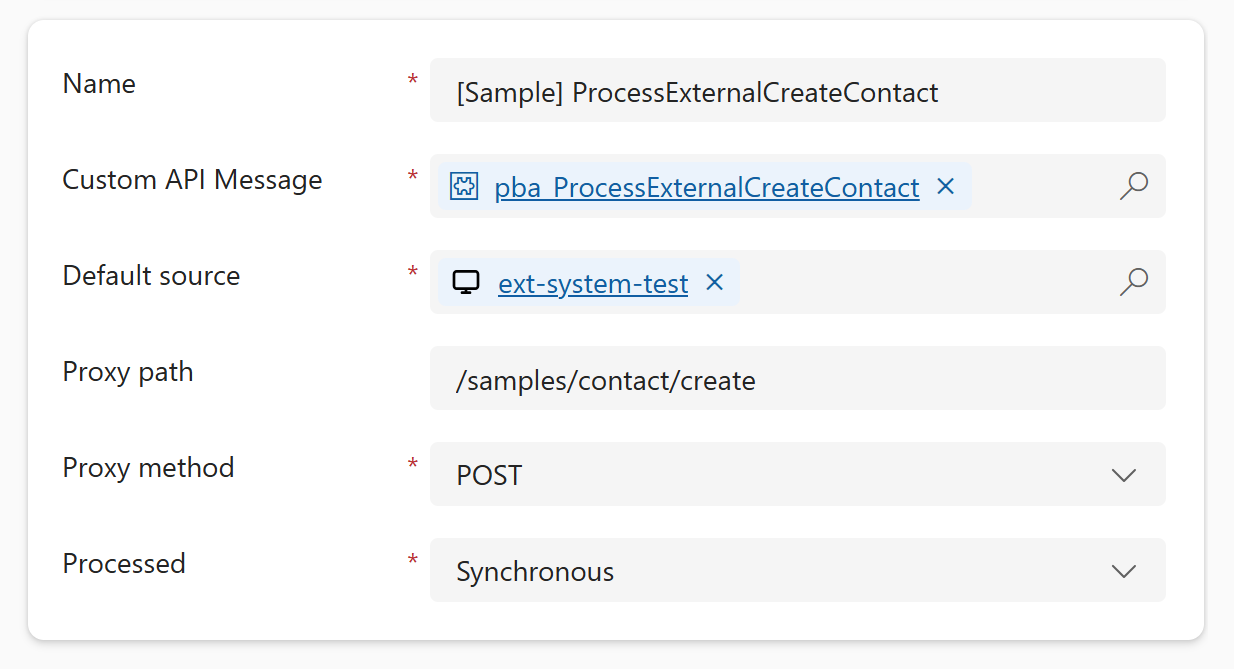
There are several options for language, runtime, and hosting. I went with a lightweight ASP.NET Core app hosted in Azure Container Apps. Other hosting options like Azure App Service should work just as well.
Hybrid architecture
No single component covers all the needs of a design-first approach end-to-end. By combining the components mentioned above, we get a complementary setup that works quite well together. Here is the solution that worked well in my scenario.
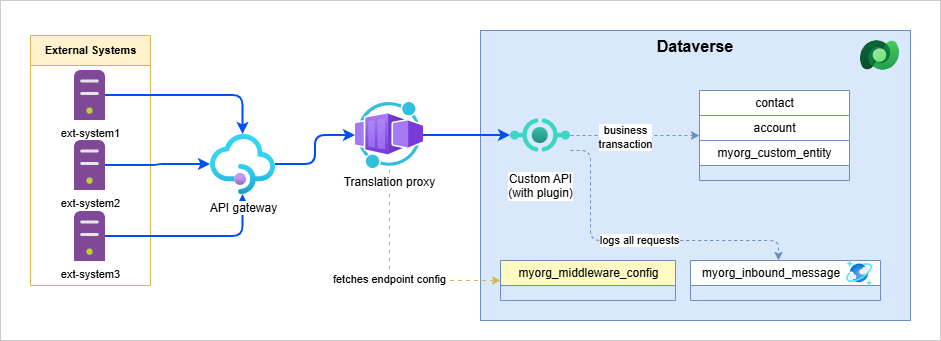
Components and roles
API gateway
As mentioned, ideally as a Power Platform engineer, I want to avoid running my own API gateway and instead use an org-wide gateway that my team does not have to operate. If such an opportunity occurs, then utilize the gateway mainly as:
- The source of truth for agreed OpenAPI contracts
- The layer that validates requests against those contracts, so only valid requests reach your business application
Custom reverse proxy with translation
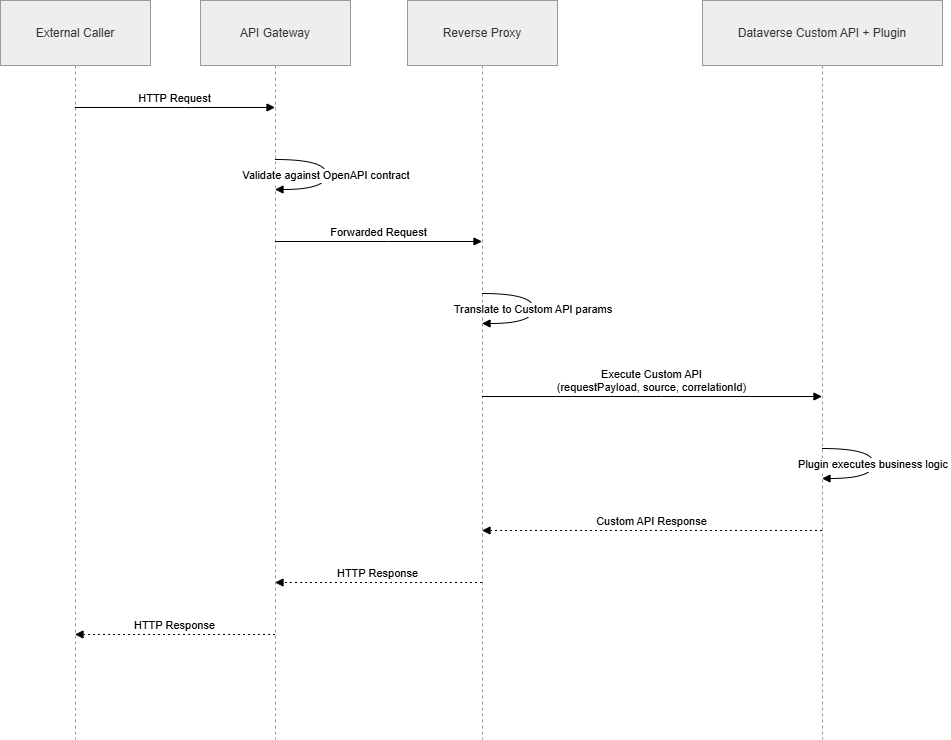
The proxy serves as the entry point into my environment. Ideally, I want to keep it as lean as possible and leave the heavy lifting to the Custom API with Plugins (described in the Dataverse plugin common logic section below).
So what exactly do we want to translate to? The goal is to pass all parameters from the request as Custom API input parameters, where they can be properly processed by the business logic. To keep the middleware as generic as possible, the Custom API contract parameters should be consistent across all endpoints.
| Parameter | Type | Description |
|---|---|---|
requestPayload |
String | Encoded JSON object that consists of the following: body, path parameters and query strings. Those three things can be optionally split into their own input parameters. |
source |
String | Optional: unique consistent identifier of the external caller (system). Usually received as part of the header in the request. |
correlationId |
String | Optional: id for end-to-end tracing of operations |
Dataverse plugin common logic
I won’t go into too much detail here, as I want to keep this article at a certain level of abstraction. You can get quite creative by building common core logic and, for example, wrapping it in a custom PluginBase class. Generally, processing sync and async requests involves some shared logic that should follow consistent rules.
-
Request parsing — As mentioned above, the proxy bundles the body, path parameters, and query strings into a single JSON envelope before invoking the Custom API. Unpacking and deserializing it into strongly typed DTOs should be owned by shared dispatcher infrastructure — so each plugin receives an already-parsed typed object and stays focused purely on business logic.
-
Error handling — Sync and async modes differ here. For sync operations, a shared dispatcher should catch all exceptions and translate them into structured HTTP-style responses (4xx for business rule violations, 5xx for unexpected failures), with the audit record always persisting regardless of outcome. For async, the middleware returns a
202 Acceptedimmediately with a correlation ID, and the plugin processes the request in the background. Unhandled exceptions should surface to trigger the platform’s retry mechanism — but permanent failures need explicit handling to break the retry loop. How the caller learns about the final outcome (webhook callback vs. polling a status endpoint) depends on what the API contract defines. -
DTO generation — Developers can benefit from the design-first approach by using the OpenAPI/Swagger file to generate request/response objects and take advantage of strong typing. Tools like NSwag can really help here.
-
Idempotency — Utilize patterns like upserts on a natural key or correlation ID guard checks (skip if already processed) to make re-execution safe.
-
Logging — We have plugin trace logs, but I believe that integration scenarios deserve their own dedicated logging storage. For logging inside Dataverse, I strongly recommend using Elastic tables due to their many benefits (automatic retention, JSON columns with Cosmos queries, partitioning for query performance, etc.). Azure Log Analytics is also a viable alternative.
AuthN and AuthZ
Although it is not typically part of the API design, we shouldn’t leave authentication and authorization as an afterthought.
Typically, you come across two approaches when it comes to caller identification, assuming you are using OAuth2. Either the identity of the request is the original caller (actual end-user or service principal), or authentication is handled by the API gateway (with a token belonging to the gateway’s service principal). In either scenario, you should know beforehand what identities to expect that will be calling your APIs.
Another thing to keep in mind is whether the caller (external system or API gateway) declares directly that it wants to be authorized to access the Dataverse URI - typically by using scope such as https://yourorg.crm4.dynamics.com/.default. In such a scenario, the caller needs to be aware of the actual Dataverse URI behind the proxy. Alternatively, it might be worth considering using the on-behalf-of flow to do an access token exchange, if you want to simplify the process for external callers.
Lastly, make sure you have your Dataverse row-level security properly configured, especially if the original caller identities should be the principals that execute the business transactions in Dataverse (in order to keep the audit trail).
Wrapping up
This setup is not lightweight. You are adding a hosted service, a configuration entity, and a translation layer to what might otherwise be a simple flow. Before going down this path, it is worth asking honestly whether the volume and governance requirements of your integrations actually justify it. For low traffic, low-stakes inbound calls where contract rigidity is not a hard requirement, the native platform options covered at the beginning are probably the better trade.
When the complexity is justified, the key design principle I would take away from this is: keep the proxy thin and generic, and let the Custom API with plugins own the business logic. The proxy’s only job is to translate HTTP into a Dataverse message — it should not know anything about what the endpoint actually does. That separation is what keeps the middleware stable and lets the business logic evolve independently, without redeployments.
There is a lot this article deliberately skips — the actual proxy implementation, how to wire up the container deployment into your ALM pipeline, and more advanced plugin patterns like async callback handling. I may cover those in follow-up posts sometime in the future.