Custom APIs in Dataverse have been available for a while now, serving as a great pro-code alternative to custom actions. However, they are synchronous by design; calling the custom message exposed by the API executes the plugin logic as a main operation in the execution pipeline. There are scenarios where you may not want to wait for the plugin to complete. I have found two viable solutions to achieve this.
Background Operations
Microsoft introduced Background operations back in 2023. To this day, they remain in (public) preview. They offer several nice features out of the box that:
- Proactive status monitoring: You can query the background operation table)
- Callback: It supports a webhook to receive the operation result and an
OnBackgroundOperationCompletemessage that we can subscribe to if we need to react to the operation’s completion. - Cancellation: Support for on-demand cancellation of an operation.
Starting an operation is easily triggered from Power Automate, as the Dataverse connector has a built-in action to create a new background operation.
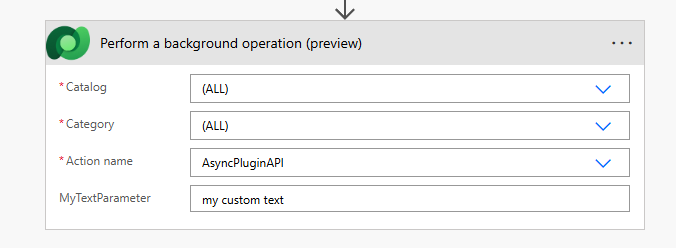
Regarding .NET, the SDK doesn’t have a request class included so we have to use the OrganizationRequest class.
//Custom API reuqest (class generated via pac cli modelbuilder or similar tool)
var customApiRequest = new beer_AsyncPluginAPIRequest
{
    MyTextParameter = "my text value"
};

var backgroundOperationsRequest = new OrganizationRequest("ExecuteBackgroundOperation")
{
    Parameters =
    {
        {"Request", customApiRequest}
    }
};

service.Execute(backgroundOperationsRequest);
For Web API (as well as .NET SDK), Microsoft provides some valuable examples.
Are there any downsides to using Background Operations?
Based on my experience, they are simply unreliable regarding completion timing. I tested them in a Sandbox environment, and occasionally, an operation did not start for tens of minutes or even a couple of hours. While the point of this feature is Fire-and-Forget some guaranteed reliability would be preferable.
Furthermore, as all my development occurs in Developer environments, background operations there often failed to start entirely, remaining stuck in the Waiting For Resources state indefinitely. Working with them during development is a huge pain at least for me.
Finally, they have been in preview for a considerable time, so I am not yet convinced they are ready for production use.
Asynchronous Plugin Steps
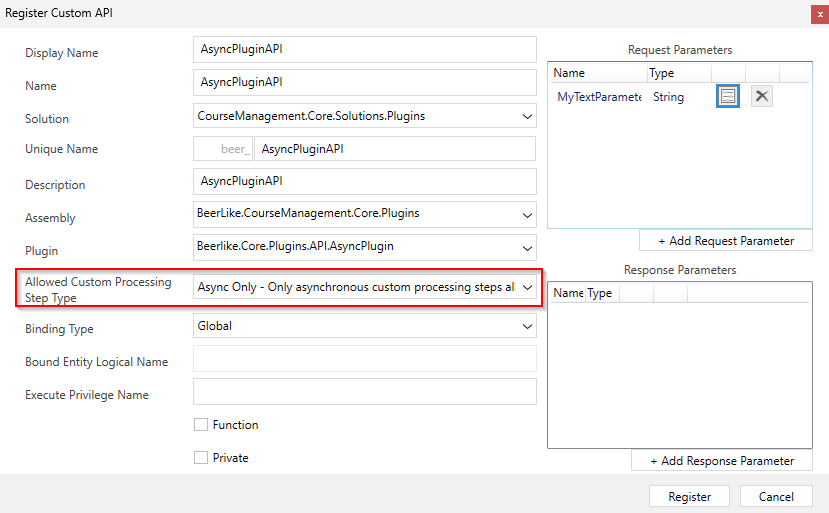
I first came across this pattern while debugging a Custom API plugin via the Plugin Profiler (see Andrew Butenko’s article). Besides the Custom API, you register a post-operation asynchronous plugin step on the same plugin and message exposed by the Custom API. To do this, ensure you allow adding async custom processing steps to the Custom API message.
Then you can register an asynchronous plugin step on the same message.
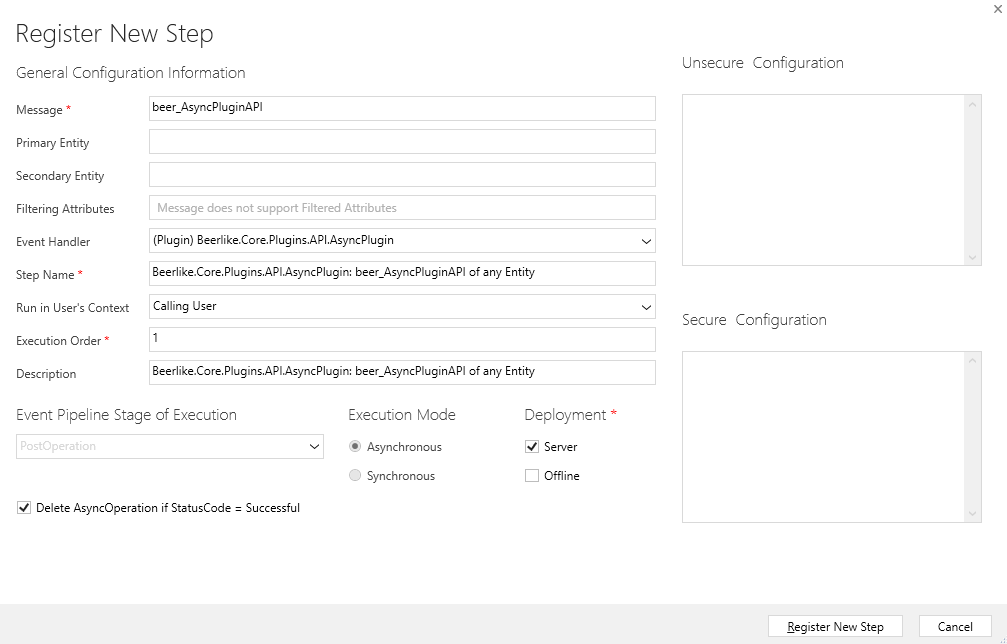
When calling the Custom API message, the plugin executes twice: first as a main operation (Stage 30) and then as a post-operation (Stage 40). Of course, we want to avoid executing the logic twice. We must check the current stage from the plugin execution context and skip the logic if we are in the main operation stage of the execution pipeline.
protected override void ExecuteDataversePlugin(ILocalPluginContext localPluginContext)
{
    var context = localPluginContext.PluginExecutionContext;
    // Exit if in the main operation stage
    if (context.Stage == 30)
    {
        return;
    }

    // Rest of your async plugin logic
    var myText = context.InputParameters["MyTextParameter"] as string;
    localPluginContext.TracingService.Trace($"Async Plugin executed with parameter: {myText}");
}
This approach works for Fire-and-Forget scenarios. Because we force the Main Operation (Stage 30) to return immediately, the Dataverse response is sent back to the caller before your asynchronous logic (Stage 40) even runs. This means you cannot return data to the caller using the Custom API’s Output Parameters
Input parameters are passed through the entire execution pipeline so that they can be utilized during the post-operation execution.
Verdict
Both approaches have pros and cons; choose the one that best fits your needs.
Background operations offer useful out-of-the-box functionality regarding status management and are easy to implement. The built-in callback webhook and the OnBackgroundOperationComplete message are, in my opinion, the best features. However, they have been in preview for over two years, are unreliable regarding start times, and simply do not work in Developer environments (at least in my experience).
Asynchronous plugin steps don’t have the out of the box bells and whistles around status management. However, because they utilize the traditional Asynchronous service, they are reliable and start almost immediately, provided your Dataverse instance is not under heavy load.
Keep in mind that neither case bypasses the 2 minute timeout for plugin execution. For long-running operations, your best options within the Platform are Power Automate flows or Custom Actions. Outside the Platform, Azure Functions are a viable option.